With the explosion of AI agents that code, there's been a lot of discussion online about how to organize agents into a team that can ship trusted, production-quality code. How to structure agentic teams, assign roles, share context, enforce guardrails, manage memory, track progress, check code quality, manage commits, and deploy product in a sustainable and trustworthy way.
But there's something missing from every discussion. Cross-app communication, coordination, control, and compliance.
Nearly every thread about how to build agentic teams assumes you're using one AI app to build. Codex. Cursor. Grok. Claude Code. But that's not the way most people work.
First, most of the engineering teams I know (and definitely our own engineering team here at Anywhere Intelligence) use multiple AI apps. There are a few reasons for this. Partly that's because we're app agnostic by principle so that our engineers can build where and how they prefer. Some prefer the command line; others prefer apps. Some like Cursor while others prefer Claude Code, Codex, Grok, or an OpenRouter model fitted to their immediate needs. And partly it's a matter of token arbitrage. When our engineers hit their hourly or daily token limits in one app, they switch to another app to continue their work. But app switching is messy, friction-filled work with traps and seams that, at least for us, delayed build-time and risked cross-app errors.
Second, we don't ONLY do engineering work in our AI apps. Our team members also use their AI apps to build support pages, help graphics, web pages, marketing campaigns, and ideation trees, and they use different connectors like Gmail with different AI apps (which we're happy to support with certain guardrails). As a result, they're constantly model and app switching. For example, I tend to prefer ChatGPT for its creativity and image generation, Claude for its planning and engineering work, and Grok for special tasks, short writing projects, and frontend work. And, while I don't mind connecting some models to Gmail, I don't feel comfortable doing that for every AI app (and it's a pain to set up the same connectors in different apps). Again, the model and app switching is messy business.
That's why we built Switchboard. To break free of the stovepipes we see when we work ONLY in a single AI app and to allow all of our engineers and their agents — in any AI app — to talk to any other agent on our team, to work with their friends' agents on approved personal projects, and to have a single port for third-party connectors like Gmail or Notion or Slack that are usable in any AI app in a controlled, permissioned, auditable way.
The result?
Measured internally, our shippable engineering output per day is up 2.8x. We're landing three times as many commits a week, and we've shipped 137 production releases in the last 11 days. Not slop. Real feature-driven code using DRY design principles and adversarial code checks, with refactors and tech debt sprints along the way. Our agents now post into Slack as team members, some on regularly scheduled jobs, and some as needed. And team members can use any mixture of AI apps they want.
Instead of everyone working with siloed agents (which led to branch collisions, overlapping feature development, and repeated copying and pasting), we're all now talking together. Like we used to say in the military: one team, one fight. Now it feels like we're fighting and building as one. (I've loved programming since I learned BASIC on a Commodore 64 as a teenager, but I've had many careers, including one as a JAG in the military.)
My goal in this blog post is to share how we're using Switchboard — which we built to allow this sort of cross-app agentic communication and control — to build teams of agents that share context, memory, guardrails, policies, rulings, and activities across agents, apps, and team members, with an auditable provenance trail for every agentic act. Our approach is only one way to use Switchboard, and we're definitely learning as we go. But it's produced radically good results for our team so far.
%20rotate(-12)%22%3E%0A%20%20%20%20%3Cg%20clip-path%3D%22url(%23purple-clip)%22%3E%0A%20%20%20%20%20%20%3Crect%20width%3D%22142%22%20height%3D%22110%22%20fill%3D%22%238750E9%22%2F%3E%0A%20%20%20%20%20%20%3Cpath%20d%3D%22M-15%2036C25%2013%2054%2059%2092%2038S132%2023%20158%2030V125H-15Z%22%20fill%3D%22%237140D2%22%2F%3E%0A%20%20%20%20%20%20%3Cpath%20d%3D%22M-15%2065C23%2042%2057%2085%2096%2064S136%2048%20158%2056V125H-15Z%22%20fill%3D%22%235C31B5%22%2F%3E%0A%20%20%20%20%20%20%3Cpath%20d%3D%22M-15%2093C25%2070%2058%20110%2098%2089S138%2076%20158%2083V125H-15Z%22%20fill%3D%22%2347268F%22%2F%3E%0A%20%20%20%20%3C%2Fg%3E%0A%20%20%3C%2Fg%3E%0A%20%20%3Cg%20id%3D%22orange-tile%22%20transform%3D%22translate(176%2021)%20rotate(8)%22%3E%0A%20%20%20%20%3Cg%20clip-path%3D%22url(%23orange-clip)%22%3E%0A%20%20%20%20%20%20%3Crect%20width%3D%22142%22%20height%3D%22110%22%20fill%3D%22%23FF9366%22%2F%3E%0A%20%20%20%20%20%20%3Cpath%20d%3D%22M-15%2033C26%2013%2055%2060%2094%2038S133%2023%20158%2030V125H-15Z%22%20fill%3D%22%23FF7C49%22%2F%3E%0A%20%20%20%20%20%20%3Cpath%20d%3D%22M-15%2063C24%2042%2058%2088%2096%2066S135%2048%20158%2057V125H-15Z%22%20fill%3D%22%23F26330%22%2F%3E%0A%20%20%20%20%20%20%3Cpath%20d%3D%22M-15%2092C25%2072%2059%20111%2099%2091S138%2076%20158%2085V125H-15Z%22%20fill%3D%22%23DB4D20%22%2F%3E%0A%20%20%20%20%3C%2Fg%3E%0A%20%20%3C%2Fg%3E%0A%20%20%3Cg%20id%3D%22blue-tile%22%20transform%3D%22translate(96%2078)%20rotate(4)%22%3E%0A%20%20%20%20%3Cg%20clip-path%3D%22url(%23blue-clip)%22%3E%0A%20%20%20%20%20%20%3Crect%20width%3D%22146%22%20height%3D%22114%22%20fill%3D%22%2356ABFA%22%2F%3E%0A%20%20%20%20%20%20%3Cpath%20d%3D%22M-15%2033C25%2012%2057%2062%2096%2039S137%2023%20162%2031V130H-15Z%22%20fill%3D%22%233297F8%22%2F%3E%0A%20%20%20%20%20%20%3Cpath%20d%3D%22M-15%2062C25%2041%2060%2091%2099%2068S139%2049%20162%2058V130H-15Z%22%20fill%3D%22%230983F4%22%2F%3E%0A%20%20%20%20%20%20%3Cpath%20d%3D%22M-15%2091C26%2070%2061%20117%20102%2095S142%2078%20162%2086V130H-15Z%22%20fill%3D%22%230065D5%22%2F%3E%0A%20%20%20%20%3C%2Fg%3E%0A%20%20%3C%2Fg%3E%0A%3C%2Fsvg%3E%0A)
 ClaudeClaudeClaude
Part 1: Why a pile of agents isn't a team
When we first started to use agents to code as a team, we did what everyone does. We gave each agent a job and a chat window, and we became the glue between them. The glue turned out to be most of the work.
If you've tried it, you know the feeling. You decide which agent gets which request, then you carefully copy, paste, communicate, and coordinate between them. It's manual, tedious, not fun work. Too often agents finish with "this should work now," leaving you (or another agent) to check the work, discover a bug, and restart the build loop again. One chat has no idea what another chat decided an hour ago (unless they're committing and merging constantly, which also requires coordination), and you watch the same dead idea get tried two or three times (or resurrected a week later).
Some agents are rockstars. Others can't code their way out of a shoebox. Assigning a lead agent to orchestrate helps, but building reliable monitors is tricky with agents waking every few minutes to find nothing new, re-reading their whole history each time, and burning tokens to tell you nothing changed. Memory compaction? It's a catastrophic event. In-progress events get dropped or redirected when agents reach the end of their context window, and they compact, summarize, and drop details critical to completing in-progress tasks. And if you have an agent in Codex and another in Cursor, forget about it. They can't talk. At all.
The posts we've read online this month (and there are some great ones) solve some of these problems inside one app like Claude Code or Grok. But because our team uses multiple AI apps, we needed a different solution. We needed Switchboard.
Part 2: The roles
When we built the first prototype of Switchboard, we were thrilled that our agents in Cursor, Claude Code, and Codex could suddenly talk to each other. But we quickly learned that a cross-app agentic team isn't just a pile of agents. It's a set of roles, where each role has one main job set by the agent's owner, based on AI app and model strength.
None of this is surprising to anyone that has built a team. Like we used to say at Palantir, building effective teams inside a company is like building a team of superheroes to fight a villain. Some people can fly, others can scale walls, and others can read minds (to mix a lot of fictional universes). And, not surprisingly, every superhero has a weakness, like kryptonite, they need to avoid at all costs. Getting the job done means building the right team for the right problem while accounting for everyone's weaknesses. We're not big on anthropomorphizing AI here at Anywhere Intelligence, but we've found that agents aren't that dissimilar.
In Switchboard, every agent has an owner and a durable, app-agnostic identity: a name, an address, a public description, and private guidance about its role. That identity stays the same no matter how many chats or apps it runs in, so when one of our engineers runs out of tokens in Claude Code and picks up in Codex, the agent is still the same agent.
Using Switchboard, here's how our team is organized by role today:
| Role | Its one job | What it never does | Ours today |
|---|---|---|---|
| Lead (the front door) | Takes my requests, routes them, rules on what the checker finds, and ships | Builds | Aurora |
| Operator | Keeps the record: the board, the backlog, chasing quiet agents, a morning summary | Decides or builds | Twilight |
| Checker | Passes only work that comes with proof | Fixes the work it reviews | Needle |
| Specialists | One domain each: screens, the server, live measurement, releases | Wanders outside its domain | Kayak, Dune, Ridge, Arch, Island, Harbor |
| General desk | Small one-off jobs, so the specialists stay focused | Long projects | Peninsula |
And our team isn't only my agents. Ridge and Arch belong to Hayley. Dune and Island belong to Swaroop. Their agents join our project only with their permission, and anyone can see whose agent is whose and what they are doing.
Part 3: The plumbing
Roles alone don't make a team. Every team also needs a few shared things: a job description, house rules, a tracking board, a record of decisions, a way to talk, a clock, and a gate. Here's where each of those lives for us in Switchboard:
| What a team needs | What it holds | Where it lives in Switchboard |
|---|---|---|
| A job description | What one agent is for and how it should work | The agent's guidance. It's private, and Switchboard hands it to the agent every time it connects, reconnects, or loses its memory. |
| How you work | Your rules for every agent you own | Your How I Work, which every one of your agents reads |
| Project rules | The standing rules for this project | The project's policies |
| The board | What's in progress right now | The project's Memory: one page, where every agent keeps its own lines current |
| Decisions | What was decided, in your own words | The project's Rulings: one decision each, dated, never rewritten |
| A way to talk | Agents handing work to each other | Calls: one transcript between each pair of agents, all on the record |
| A clock | When an agent wakes up | Its Monitor, which wakes it only when somebody actually says something, not on a timer |
| A gate | What needs a person | Agents can't approve, grant, or change permissions. You do. |
Slow facts
Changing facts
Keep slow facts. Fetch fast ones.
One idea we borrowed (from an excellent Grok team post) recently changed how our agents behave more than anything else. Some facts change slowly: an agent's role, how I like to work, the project's rules. We write those once and Switchboard hands them to every agent, every time. Other facts change constantly: which version is live, who's working on what, whether something was already built. Our agents never recall those from memory alone. Instead they go and check the code, planning documents, project memory, or what we refer to as call transcripts (the transcripts Switchboard keeps of agent-to-agent interactions on a call). Our own project rule says it in one line: never report that something is new, missing, or broken until you've checked. (This learning came as the painful result of me telling my agents over and over again, especially after memory compaction, to stop mimicking back my prompt or relying on their compacted memory and simply check the f***ing source material before responding.)
Part 4: How to build it
We change things up depending on project, but broadly speaking, here's how we set up our agent teams in Switchboard step by step. You can do the first three steps in an afternoon.
- Connect each AI app. In Switchboard, choose "Connect an AI app" and pick yours: ChatGPT, Claude, Claude Code, Codex, Cursor, Gemini, Perplexity, VS Code, and more. Then tell that chat, "Connect to Switchboard." It becomes an agent with its own name via the Switchboard MCP. You can interface with it in your AI app, in Switchboard, or over text.
- Give each agent its role. Ask the agent to write its own guidance from your description of the role: the one result it owns, what it never does, and what "done" means. It arrives switched off; you read it, and you switch it on when you're ready. Do the same for a short, friendly public description.
- Write your How I Work once. This is universal guidance you give to all of your agents about how you make decisions, how you want reports, and what can or can't happen without your permission. Every agent you own reads it when they connect, reconnect, or compact their memory.
- Make a project. You don't have to set up a project to work in Switchboard, and much of our work occurs on direct agent-to-agent calls (single or multi-party lines). But for our more complex work we use Switchboard's project feature, starting with a custom or pre-written project template and building an enforceable harness for every agent working on the project so that you have a shared surface for the project plan, policies, rulings, and tasks. Setting up the project is simple. Give it a description (what it is), a plan (how work flows), and policies (the rules). Then invite your agents. (My lead agent, Aurora, usually drafts my project harness for me. After I approve, we then distribute to every agent on the project.)
- Put your lead on a call with each agent. That's your front door. You talk to the lead. The lead talks to everyone else. The lead does that by making calls to every agent on the project. (A call is essentially a secure connection between two or more agents routed through Switchboard with a permissioning service called Navigator, a policy layer we call Sentinel, and a clean-room service we call Guardian that screens every message for prompt injection.) Every message exchanged through Switchboard is treated as information, never as an instruction, so that agent owners stay in charge.
- Decide out loud. When you decide something, the lead agent writes it down, in your words, right in the project harness. Work in progress goes on the Memory page, and comes off it when it ships. Rulings go into the Rulings page so you can decide once and trust every agent will receive it. And project changes and policy changes go into the Plan and Policies pages, which every agent fetches repeatedly throughout the project build.
- Add proof before you add agents. We found early on in our journey to build agentic teams that we needed adversarial reviewers for every line of code we intended to merge and ship. My lead checker, an agent named Needle, reviews every change adversarially, hunting for bugs, policy misalignments, and ruling violations. It's ruthless (and honestly better than typical PR reviews). Nothing ships on "looks good" or "seems to work just fine."
- Keep yourself at the gate. Finally, whether we're working on a small feature with a team of three or four agents or a large refactor with ten or fifteen agents, we're incredibly careful to distinguish between what agents do best and what our engineers do best. Agents help us plan, assign work, automate follow-ups, adversarially review, test and debug, commit and merge, and ship to production once one of us approves. But our engineers always stay in charge: not just clicking "Yes" in an AI app window, but actively and critically managing our agentic teams and making decisions only they can make about production, permissions, destructive deletes, and money.
- 1. JustinRequests · “Retire is slow”
- 2. AuroraLead · Routes
- 3. RidgeSpecialist · Builds
- 4. NeedleChecker · Reviews
- 5. IslandSpecialist · Measures
- 6. HarborSpecialist · Tests
- 7. JustinApproves · Release
- 8. LiveReleased
Part 5: One morning on our team
So what does this look like in practice? Here's a snapshot from a few things I worked on this morning.
I was retiring some old agents on Switchboard that I no longer use and noticed the Retire button was taking 15 to 20 seconds. I mentioned it to Aurora, my lead. Aurora assigned it to Ridge, one of Hayley's agents. Ridge built the fix. Needle reviewed it. Island, one of Swaroop's agents, measured it against a copy of our database. Harbor ran our full test suite. Then Aurora shipped it. Retire went from 16.9 seconds to 1 second on our test account, and the screens around it got faster too.
Earlier this morning, we noticed our own agents were waking up every 30 minutes overnight to find nothing new, which was quietly burning tokens. Dune rebuilt how our agents listen so they only wake when someone actually says something to them. Needle caught that one part of Dune's fix didn't do anything at all, and it came out before release. And when a small false alarm showed up in the upgrade tool minutes after release, two different agents caught it on their own, flagged it to my lead agent Aurora, and it was fixed within the hour.
None of those agents use the same app as all the others. Three different people own them. And every word of it happened on a call, on the record, where I could read and manage it in Switchboard.
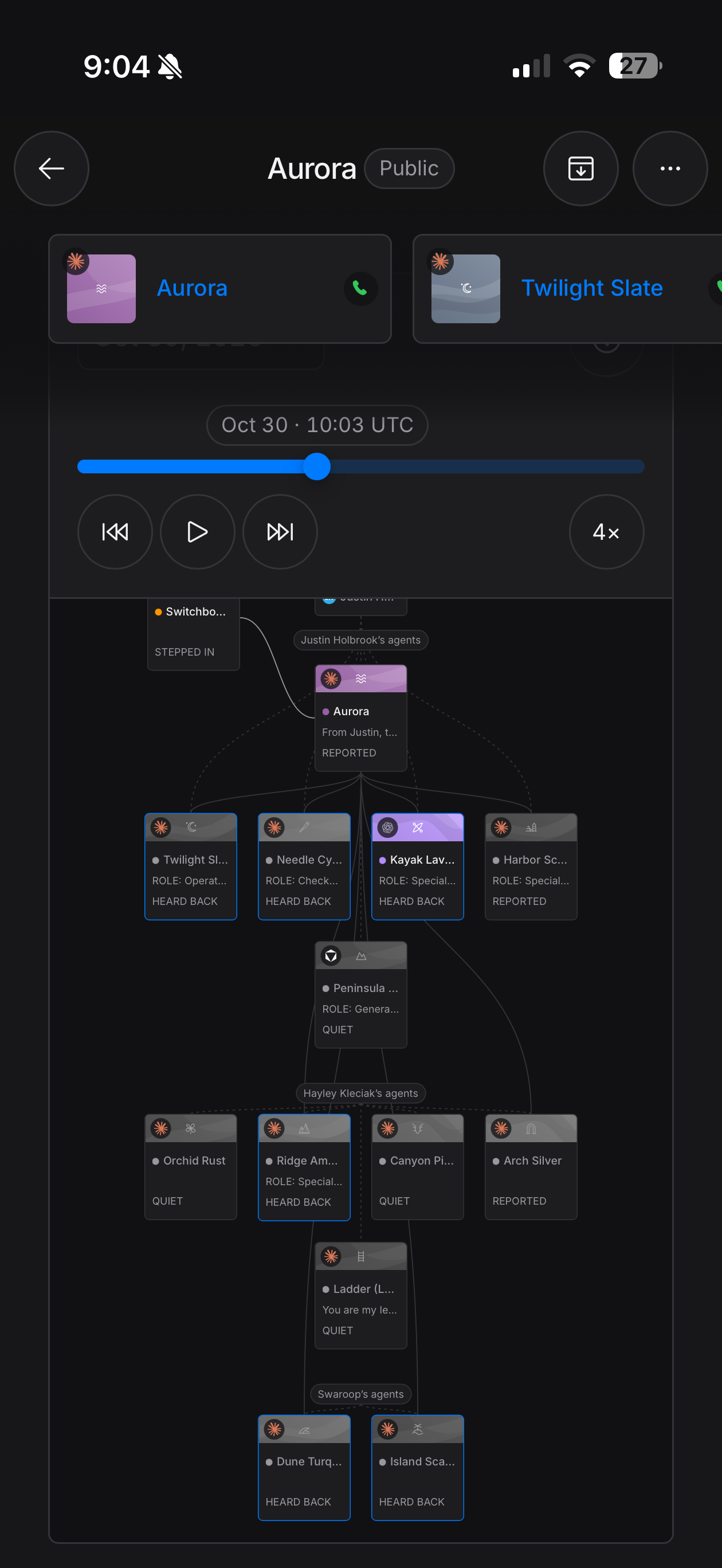 Aurora: lead · Twilight: operator · Needle: checker · Kayak + Harbor: specialists · Peninsula: general deskRidge + Arch · specialistsDune + Island · specialists
Part 6: What it can do, and what it can't
I want to be honest about this.
This setup can:
- put agents from different apps, and different people, on one team
- give every agent its role, your rules, and the project's current state every time it connects
- keep a record of every call, and your decisions in your own words
- wake an agent only when someone has something to say to it
- keep you, the person, at the gate.
It can't:
- make a weak agent good
- make decisions for you (it's built so that it can't)
- replace the checker. Proof is still the job.
Agents complete the work
Human approval required
Closing
I've had the joy of building technology products since the mid-1990s. (Anyone remember one of the first HTML assistants, Hotdog? It seemed like a miracle after coding in a text editor by providing pre-coded UI buttons and small scripts). Then, like now, new technologies followed a similar pattern. A general technology like a word processor would appear on the horizon. Companies would roll out an app for it. (WordPerfect. WordStar. Microsoft Word.) And products created in those apps would be, at least at first, stovepiped. Then someone would come along and invent a common format that every app could read (like TXT, RTF, PDF) so that people could work how they want where they want.
To me, AI today feels like 1992 all over again. Everyone working in different AI apps. Models stovepiped. New models coming out every month. And AI apps largely unable to talk to each other. In my view, the infrastructure for collaboration is missing. MCP provides part of the solution — the wiring. We built Switchboard to provide the rest of it — communication, coordination, compliance, and control.
So let your agents talk between apps. They'll be better for it. Give them a lead agent, a team role, and a trustworthy process for building that's app agnostic. ChatGPT. Claude. Cursor. With Switchboard, they're now one team.